2008-09-26

initialization discards qualifiers from pointer target type

A const may be needed, the following produces the error:

PixelPacket *p = AcquireImagePixels(image,0,y,image->columns,1,&image->exception);


while this fixes it:

const PixelPacket *p = AcquireImagePixels(image,0,y,image->columns,1,&image->exception);


In other news hopefully soon I'll have an ARToolkit app for reading in jpegs using ImageMagick, and also that app will have some other more exciting attributes.

2008-09-08

Increased Dynamic Range For Depth Maps, and Collages in Picasa 3


360 Vision + 3rd Person Composite from binarymillenium on Vimeo.

After I compressed the above video into a WMV I was dissatisfied with how little depth detail there is in the 360 degree vision part - it's the top strip. I initially liked the cleaner single shade look, but now I realize the utility of using a range of colors for depth fields (or IR/thermal imaging also)- it increases the number of colors to represent different depths beyond 256 to a larger number. Earlier I tried using one color channel for higher order bits and another for lower order bits (so the depth could be computed like red*256+green) for a total of 256*256 depth levels (or even 256^3 or 256^4 using alpha), but visually it's a mess.

But visual integrity can be maintained while multiplying that 256 levels by five or a bit more with additional work.

Taking six colors, three of them are pure red, green, blue, and inbetween there is (255,255,0) for yellow and the other two pure combinations of two channels. Between each subsequent set there can be 256 interpolated values, and in the end a color bar like the follow is generated with 1280 different values:


The bottom color bar shows the differences between adjacent values- if the difference was none then it would be black in spots, so my interpolation is verified.

Applying this to the lidar data, I produced a series of images with a processing project:


After making all the images I tried out Picasa 3 to produce a collage- the straightforward grid makes the most sense here. Picasa 3 crashed a few times in the collage editor before I was able to get this exported.

2008-08-31

Photosynth Export Process Tutorial

It looks like I have unofficial recognition/support for my export process, but I get the feeling it's still too user unfriendly:

http://getsatisfaction.com/livelabs/topics/pointcloud_exporter


What to do

Get Wireshark http://www.wireshark.org/

Allow it to install the special software to intercept packets.

Start Wireshark. Put

http.request

into the filter field.

Quit any unnecessary network activity like playing youtube videos- this will dump in a lot of data to wireshark that will making finding the bin files harder.

*** Update ***
Some users have found the bin files stored locally in %temp%/photosynther, which makes finding them much easier than using Wireshark, but the for me on Vista the directory exists for one user but not others- but the bin files have to be stored locally somewhere right?
***

Open the photosynth site in a browser. Find a synth with a good point cloud, it will probably be one with several hundred photos and a synthiness of > 70%. There are some synths that are 100% synthy but have point clouds that are flat billboards rather than cool 3D features- you don't want those. Press p or hold ctrl to see the underlying point cloud.

*** Update ***
Use the direct 3d viewer option to view the synth, otherwise you won't get the synth files. (thanks losap)
***

Start a capture in Wireshark - the upper left butter and then click the proper interface (experiment if necessary).

Hit reload on the browser window showing the synth. Wireshark should then start show ing what files are being sent to your computer. Stop the capture once the browser has finished reloading. There may be a couple screen fulls but near the bottom should be a few listings of bin files.
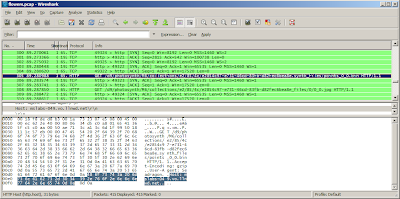


Select one of the lines that shows a bin file request, and right-click and hit Copy | Summary (text). Then in a new browser window paste that into the address field. Delete the parts before and after /d8/348345348.../points_0_0.bin. Look back in Wireshark to discover what http address to use prior the that- it should be http://mslabs-nnn.vo.llnwd.net, but where nnn is any three digit number. TBD- is there a way to cut and paste the fully formed url less manually?

If done correctly hit return and make the browser load the file- a dialog will pop up, save it to disk. If there were many points bin files increment the 0 in the file name and get them all. If you have cygwin a bash script works well:

for i in `seq 0 23`
do
wget http://someurl/points_0_$i.bin
done


Python

Install python. If you have cygwin installed the cygwin python with setup.exe, otherwise http://www.python.org/download/ and download the windows installer version.
*** UPDATE *** It appears the 2.5.2 windows python doesn't work correctly, which I'll look into- the best solution is to use Linux or Cygwin with the python that can be installed with Linux ***

Currently the script http://binarymillenium.googlecode.com/svn/trunk/processing/psynth/bin_to_csv.py works like this from the command line:

python bin_to_csv.py somefile.bin > output.csv


But I think the '>' will only work with cygwin and not the windows command prompt. I'll update the script to optionally take a second argument that is the output file.

If there are multiple points bin files it's easy to do another bash loop to process them all in a row, otherwise manually do the command above and create n different csvs for n bin files, and then cut and paste the contents of each into one complete csv file.

The output will be file with a long listing of numbers, each one looks like this:

-4.17390823, -1.38746762, 0.832364499, 24, 21, 16
-4.07660007, -1.83771312, 1.971277475, 17, 14, 9
-4.13320493, -2.56310105, 2.301105737, 10, 6, 0
-2.97198987, -1.44950056, 0.194522276, 15, 12, 8
-2.96658635, -1.45545017, 0.181564241, 15, 13, 10
-4.20609378, -2.08472299, 1.701148629, 25, 22, 18


The first three numbers are the xyz coordinates of a point, and the last three is the red, green, and blue components of the color. In order to get a convention 0-255 number for each color channel red and blue would have to be multiplied by 8, and green by 4. The python script could be easily changed to do that, or even convert the color channels to 0.0-1.0 floating point numbers.

Point Clouds - What Next?
The processing files here can use the point clouds:
http://binarymillenium.googlecode.com/svn/trunk/processing/psynth/

Also programs like Meshlab can use them with some modification- I haven't experimented with it much but I'll look into that and make a post about it.

2008-08-28

Color Correction


I have the colors figured out now: I was forgetting to byteswap the two color bytes, and after that the rgb elements line up nicely. And it's 5:6:5 bits per color channel rather than 4 as I thought previously, thanks to Marvin who commented below.

The sphinx above looks right, but earlier the boxer shown below looked so wrong I colored it falsely to make the video:


The Boxer - Photosynth Export from binarymillenium on Vimeo.

But I've fixed the boxer now:


The python script is updated with this code:


bin.byteswap()
red = (bin[0] >> 11) & 0x1f
green = (bin[0] >> 5) & 0x3f
blue = (bin[0] >> 0) & 0x1f

2008-08-27

Exporting Point Clouds From Photosynth


Since my last post about photosynth I've revisited the site and discovered that the pictures can be toggled off with the 'p' key, and the viewing experience is much improved given there is a good point cloud underneath. But what use is a point cloud inside a browser window if it can't be exported to be manipulated into random videos that could look like all the lidar videos I've made, or turned into 3D meshes and used in Maya or any other program?

Supposedly export will be added in the future, but I'm impatient like one of the posters on that thread so I've gone forward and figured out my own export method without any deep hacking that might violate the terms of use.

Using one of those programs to intercept 3D api calls might work, though maybe not with DirectX or however the photosynth browser window is working. What I found with Wireshark is that http requests for a series of points_m_n.bin files are made. The m is the group number, if the photosynth is 100% synthy then there will only be one group labeled 0. The n splits up the point cloud into smaller files, for a small synth there could just be points_0_0.bin.

Inside each bin file is raw binary data. There is a variable length header which I have no idea how to interpret, sometimes it is 15 bytes long and sometimes hundreds or thousands of bytes long (though it seems to be shorter in smaller synths).

But after the header there is a regular set of position and color values each 14 bytes long. The first 3 sets of 4 bytes are the xyz position in floating point values. In python I had to do a byteswap on those bytes (presumably from network order) to get them to be read in right with the readfile command.

The last 2 bytes is the color of the point. It's only 4-bits per color channel, which is strange. The first four bits I don't know about, the last three sets of 4 bits are red, blue, and green. Why not 8-bits per channel, does the photosynth process not produce that level of precision because it is only loosely matching the color of corresponding points in photos? Anyway as the picture above shows I'm doing the color wrong- if I have a pure red or green synth it looks right, but maybe a different color model than standard rgb is at work.

I tried making a photosynth of photos that were masked to be blue only- and zero synthiness resulted - is it ignoring blue because it doesn't want to synth up the sky in photos?

Anyway here is the python script for interpreting the bin files.

The sceneviewer (taken from the Radiohead sceneviewer) in that source dir works well for displaying them also.

Anyway to repeat this for any synth wireshark needs to figure out where the bin files are served from (filter with http.request), and then they can be downloaded in firefox or with wget or curl, and then my script can be run on them, and processing can view them. The TOC doesn't clearly specify how the point clouds are covered so redistribution of point clouds, especially those not from your own synths or someone who didn't CC license it, may not be kosher.